Reply before they disappear
Tap the LeadCatch Reply button after a missed call. It opens a ready-to-send text from your normal text app with the request link already written.
When you are on a job, missed calls do not wait. LeadCatch Local sends the caller a fast text link where they can leave the job details, so you get a quote-ready lead without stopping the work you are already doing.
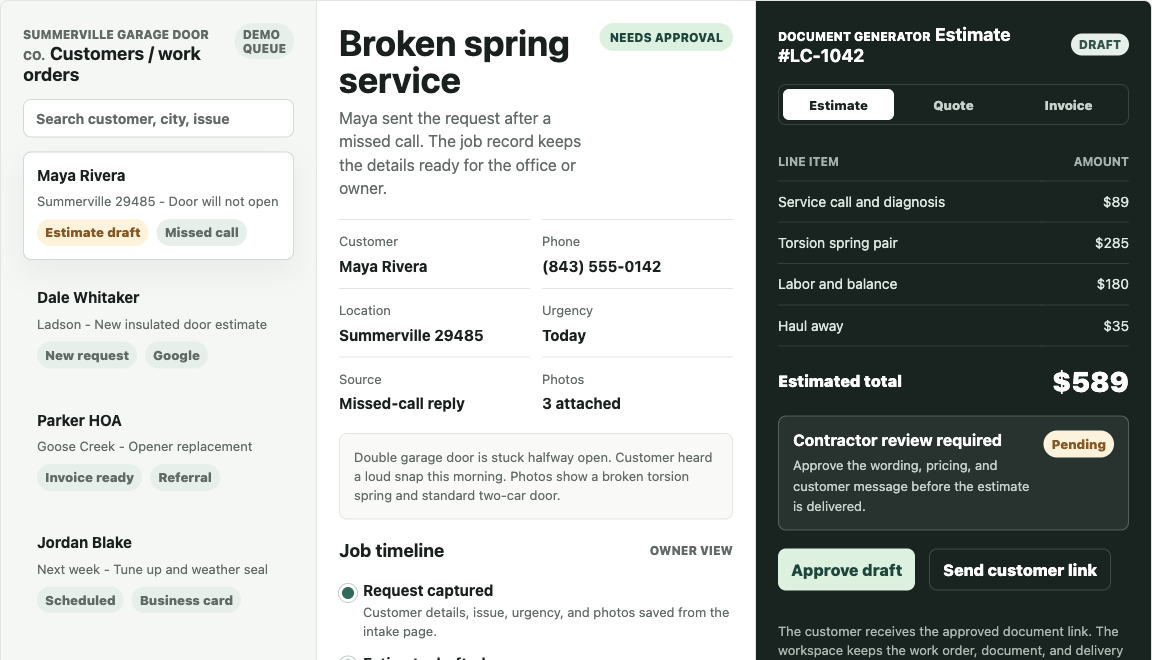
LeadCatch Local helps you save missed callers, collect the job details, and respond faster with the information already organized. It is not an answering service, ad management, CRM, or full contractor management platform.
A broken spring, leak, or no-cool call is urgent to the homeowner. If the phone goes to voicemail, the request link gives them something useful to do before they call the next company.
Tap the LeadCatch Reply button after a missed call. It opens a ready-to-send text from your normal text app with the request link already written.
Name, phone, city, service issue, timing, notes, and optional photos stay together so nobody rebuilds the job from voicemail or scattered texts.
Use the captured request to call back, price the job, or draft a faster estimate after you review the scope.
LeadCatch Local does not need a big rebuild. Put the request page wherever customers already find the business. Each request comes in with the customer details, service issue, timing, and source already attached.
A home-screen reply button opens a ready-to-send text with the request link already written.
Customers can leave the full job details instead of bouncing to the next contractor.
Cards, magnets, trucks, and yard signs can point to a request page instead of only a phone number.
Use the link in profiles, posts, messages, and buttons so social traffic lands on a focused request flow.
Add one button to an old site without rebuilding forms, hosting, or backend routing.
Give past customers one link they can send to neighbors, family, and property managers.
The first market may not be garage doors. These trade samples keep the same narrow missed-call hook and adapt the request page to jobs where photos, symptoms, timing, or access notes matter.
Removal, trimming, storm cleanup, and photo-heavy estimates.
View tree sampleSmall repair lists, doors, drywall, fixtures, and punch-list work.
View handyman sampleDriveways, siding, roofs, decks, and exterior cleaning requests.
View wash sampleGate repair, storm damage, panels, posts, and new sections.
View fence sampleRefrigerators, washers, dryers, dishwashers, symptoms, and model details.
View appliance sampleResidential, commercial, and public-facility requests can capture scope, access, frequency, and contract requirements before callback.
View cleaning sampleBroken springs, stuck doors, openers, and urgent repair calls.
View garage-door sampleThe launch version is intentionally simple: a request page, missed-call reply path, lead routing, setup help, and basic monitoring while the offer is being validated with local contractors.
A branded request page for service calls, with fields and service options matched to the contractor's trade.
A phone home-screen button that opens a ready-to-send text. The owner reviews it, then sends it.
Captured requests keep customer info, source, service issue, timing, notes, and photo context together.
Use the job details to draft a faster estimate after you review scope, parts, access, and pricing.
The contractor decides what to send, what to charge, and when to follow up.
The first conversion is not checkout. It is seeing your own business name, services, missed-call text, and request page so you can decide whether it fits.
Send the business name, trade, service area, and phone type. I draft the missed-call reply and request page around that business.
You confirm the services, reply text, customer fields, and what the customer sees before the page is used publicly.
After checkout, we install the reply button, run one test lead, and place the link on Google, Facebook, cards, QR codes, or your site.
Instead of rebuilding the job from voicemail, texts, and scattered notes, the request carries customer info, service details, urgency, source, and notes from the first intake.
LeadCatch Local works best when people already call, text, search, click, or get referred, but the business has no clean way to capture the job details before the moment goes cold.
Add one request button without rebuilding the whole site.
Keep calls and texts, but give warm leads a structured place to land.
Turn cards, magnets, and QR codes into trackable request paths.
Includes the sample preview, request page setup, missed-call reply button instructions, lead routing, quote-ready intake details, and basic monitoring for early local businesses.
No setup fee for launch clients. Ask for a sample first, approve the preview, then subscribe if it fits. Cancel anytime.
Request sample first Already approved? Subscribe